You can login to (using my preferences as an example) DDG and configure it to not use AI, but I mostly browse in private/incognito mode and don’t care to login to DDG every time I open a browser. However, I - and you - don’t have to login to enforce that preference; at least with DDG you can set a default search engine that automatically avoids it. Here are the parameters in mobile Firefox:

Even in Chrome and Chrome derivatives, you can set a default search engine; I don’t know the exact steps, but the end result should look similar to the above.
If you prefer to stick with Google, even they offer a no AI solution. I haven’t used Google in years, but according to arstechnica, this would be the equivalent configuration:
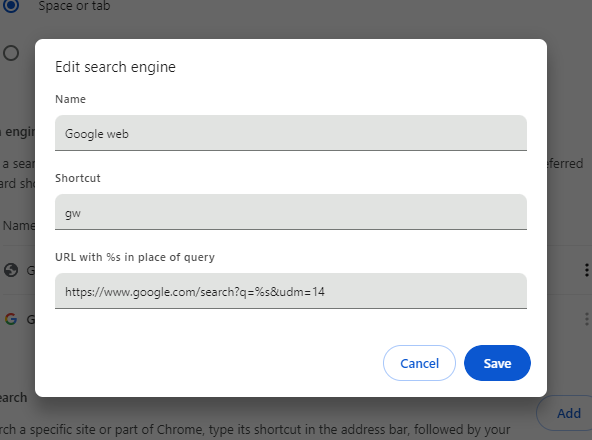
I’ve not used any other search engines since Altavista, so I can’t provide details for each one, but hopefully this is a good starting point.
edit: It seems this changed … Or maybe I had it wrong from the beginning, but I tested this when I posted it, so I think it changed. Regardless, the q= is not necessary currently.
Fun fact: DDG No Ai became the default search engine in Librewolf, replacing the regular DDG, a few updates ago.
These are the ones I use (Kagi needs to be logged in, but you could use Privacy Pass with their extension for anonymous searching - I haven’t tested if it needs any extra configuration to block AI with Privacy Pass)
Name: Kagi
URL: <Copy Session Link from a logged in window>
Keyword: @k
Suggestion Url: https://kagisuggest.com/api/autosuggest?q=%25s

Name: DuckDuckGo.noai
URL: https://noai.duckduckgo.com/?start=1&q=%25s
Keyword: @d
Suggestion URL: https://ac.duckduckgo.com/ac/?type=list&q=%25s

Name: Brave.noai
URL: https://search.brave.com/search?summary=0&q=%25s
Keyword: @b
Suggestion URL: https://search.brave.com/api/suggest?q=%25s
The
start=1parameter on DDG keeps it from doing the first run popups when searching in private windows.Also, I haven’t tried but you can theoretically mix and match suggest URLs with different search engines if you wanted to somehow decouple search suggestions from actual searches.Edit: on second thought, that’s effectively just doubling the number of entities who know what you’re searching for. I see no privacy benefit to decoupling. Perhaps something to do if one engine’s suggestions are pure trash.
Why anyone would ever trust Brave after their affiliate link hijacking is beyond me.
They’re scummy crypto bros, but in my anecdotal testing, their search engine is more likely to turn up useful results than DDG.
They are, however, a fallback to the fallback in my search flow, so they get used like 1x/year. There would be little benefit to searching another Bing clone after DDG, and I have no interest in searching Google, so this is where I’ve landed.
Would be happy to expand the list if you have suggestions for search engines, and the associated codes for blocking AI summaries in private searches.
have you looked into startpage?
They’re fine in a pinch, they used to be a Google clone but in the past couple of years the quality has gone down and it seems they mostly source from Bing (though they dont provide statistics) (https://support.startpage.com/hc/en-us/articles/4522435533844-What-is-the-relationship-between-Startpage-and-your-search-partners-like-Google-and-Microsoft-Bing)
Since DDG also primarily uses Bing, it does not provide any added value to my searchflow, so I’m not sure what is required to block AI in private searches on Startpage.
Thanks for that I was having trouble figuring out the address I had to plug into get DDG no ai to work as my default search
What is love is to filter out all the AI websites that get returned. I think this just stops the AI sanders box and some AI images.
would be cool if you could put the string in a codeblock for easy copying
For DDG,
https://noai.duckduckgo.com/?q=%25sBut it seems it changed, so
https://noai.duckduckgo.com/%sedit: as pointed out below, the first one (now corrected) was missing a ?. I am simply a dumbass for missing it. Hopefully that helps anyone coming on this in the future.
The first URL is missing a question mark: https://noai.duckduckgo.com/?q=%25s
Edit: Please ignore the “25”. It should end with “%s”. I can’t actually write that, due to a Lemmy bug. 🫠
Oh, you’re right. I’m just a dumbass. Thank you!
q=%s worked as recently as last week for me. They might as well automate the extensions and let you just use the domain name as an input to make it easier for the layperson to do.
thank you!
No problem.
deleted by creator
While not a native Spanish speaker, I somehow read that as “doesn’t have it”. I need to ask my hispanic friends if they would ever use a subdomain like
noaiaifor the AI-free version?
Oh that’s clever. I could see
noaiyiyibeing used as a tag to filter out slop posts.
Things like this is exactly how I got hacked for the first time in my life even though I’d say I’m pretty careful as someone who eventually ended up working in Cybersecurity.
When anti-adblocks started being a thing, there was a pretty well recommended alternative, I think something like NanoDefender? Don’t remember the name. Several hundred thousand installs, recommended as a good alternative that’s not blocked as often as AdBlock was. Made it my default adblock.
Two years later, the guy sold the extension to a “company” that immediately pushed a infostealer update.
So, installing random extension if I can avoid it, unless it’s really well known, like Bitwarden or UBlock, is never worth it. Especially if you can easily solve it some other way.
I mean the extension is published by the Duckduckgo team… Also I can get my friends and family click on that, but no way to make them edit some settings.
Ah, in that case it’s probably fine. Didn’t really check it. But yeah, I’d consider that a trusted provider.
Chrome? Gross…Sorry, I thought you only included a Chrome one, the links looked like just one to me!
The original post talks about chrome derivatives so I thought I’ll give links to both.
Damn, I totally missed the FF one until I saw this comment! Sorry…
You say “just do this,” but installing something seems like more than just editing the configuration to me.
You made me finally check ecosia if there is an ai free feature and there is and it seems to filter out ai images in the image search BLESS
I’ve been looking for a way to do this for Qwant, but not sure it’s possible… 🫤
You can also just go to duck.ai if you so feel